Question Bank
The Question Bank is a reusable library of assessment questions shared across your whole workspace. Write a good question once, save it to the bank, and pull it into any future assessment in two clicks — instead of rewriting the same skills check for every role.
Pitch N Hire also ships a set of platform questions, curated by our team and visible to every company. You can use them as they are, or clone one into your own bank and edit it.
Overview
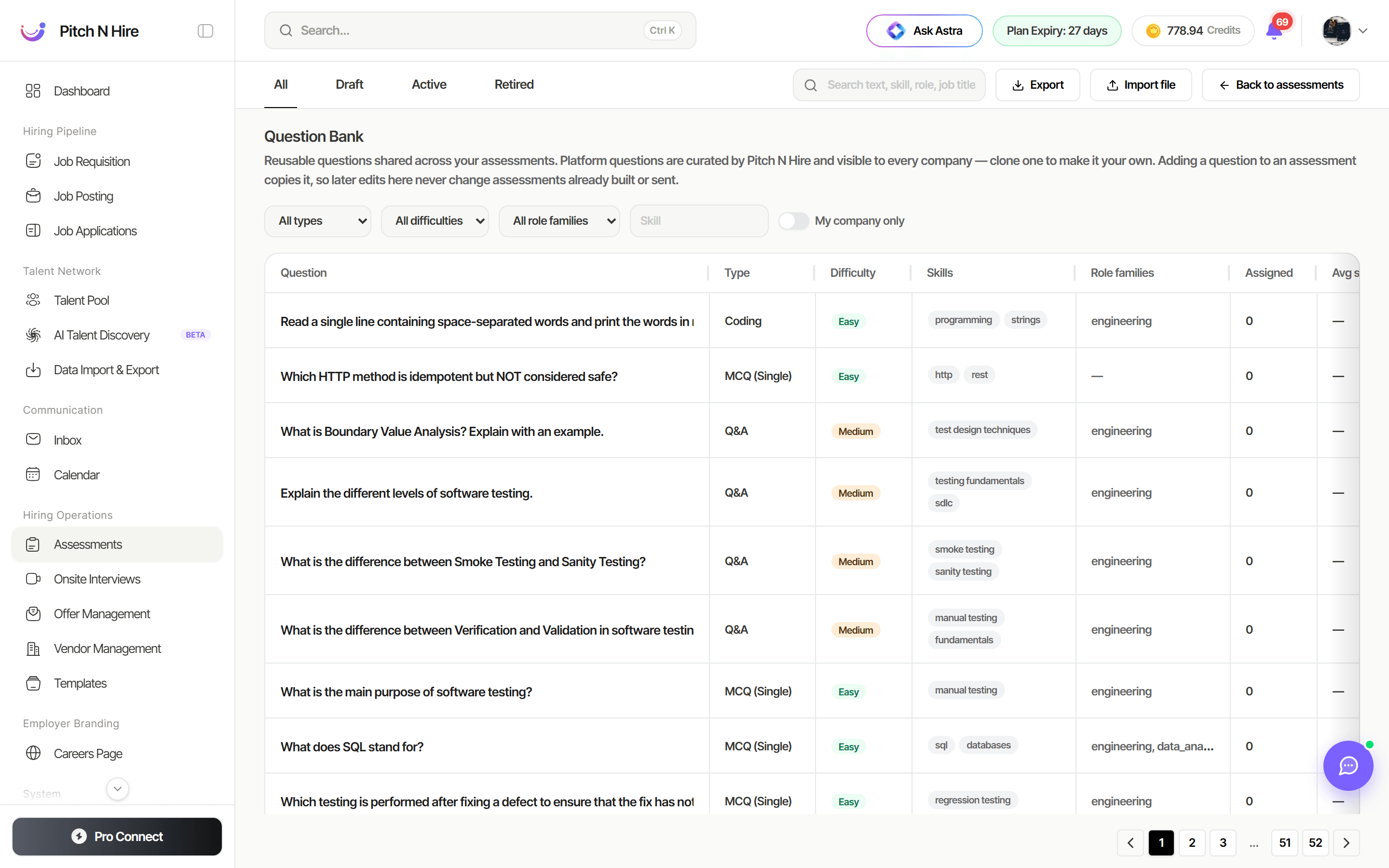
Questions are listed in a single table with status tabs across the top — All, Draft, Active and Retired — plus a search box and filters.
Each row shows:
| Column | What it tells you |
|---|---|
| Question | The question text, flagged if it’s statistically suspect (nearly everyone, or almost nobody, answers it correctly). |
| Type | MCQ (single), MCQ (multi), Q&A or Coding. |
| Difficulty | Easy, Medium or Hard. |
| Skills | The skills the question tests. |
| Role families | Engineering, Data & analytics, DevOps, Ops & business, or Non-technical. |
| Assigned | How many times the question has been used. |
| Avg score | How candidates have performed on it. |
Row actions let you clone a question into your company bank, edit it, or retire it when it’s no longer fit for use.
Filter the bank
Narrow the list with the filter bar:
- Search — free text across question text, skill, role and job title.
- Type — All types, MCQ (single), MCQ (multi), Q&A, Coding.
- Difficulty — All difficulties, Easy, Medium, Hard.
- Role family — Engineering, Data & analytics, DevOps, Ops & business, Non-technical.
- Skills — filter to a single skill.
- My company only — hide the platform library and show just your company’s questions.
Add questions to the bank
Save a question you have already written
While viewing an assessment, use the Save to bank action on any question. Set its Difficulty, tag the Role families it suits, and list the Skills it tests (for example SQL, Node.js) so it’s easy to find later.
Import a file
Click Import file to bulk-load questions. Upload a .csv, .xlsx, .xls or .json file of up to 10,000 rows, covering MCQ, written-answer and coding questions. Download the CSV template first so your columns match — after the import, any rows that couldn’t be read are listed back to you so you can fix and re-upload just those.
Export
Export downloads the current bank so you can review it offline or move it between tools.
Use the bank when building an assessment
- Open an assessment from Hiring Operations → Assessments.
- Click Add from bank. The Add from question bank picker opens, with a reminder that “Only active questions can be added. Selected questions are copied onto this assessment — editing them in the bank later will not change this assessment.”
- Pitch N Hire opens with suggested questions based on the job the assessment is linked to (falling back to the assessment’s title) — the fastest route for a role-specific test.
- To go wider, use the filters (type, difficulty, role family, skill) or search; only Active questions can be added.
- Tick every question you want — a running “n selected” count sits beside the button — then click Add selected to copy them all onto the assessment in one go.
Full assessment-building details are in Assessments & Templates.
Tips
Common issues & fixes
- A question doesn’t appear in Add from bank — only Active questions can be added. Check the status tabs; a Draft or Retired question won’t be offered.
- You can’t edit a question — platform questions are read-only. Use Clone into my company bank, then edit your copy.
- An edit didn’t change an existing assessment — that’s intended. Questions are copied when added, so update the assessment’s own copy instead.
- Import rows were rejected — the rejected rows are listed after the import. Start from the downloaded CSV template to be sure the columns match.
- You only want your own questions — turn on the My company only filter to hide the platform library.