Job Forms Tab
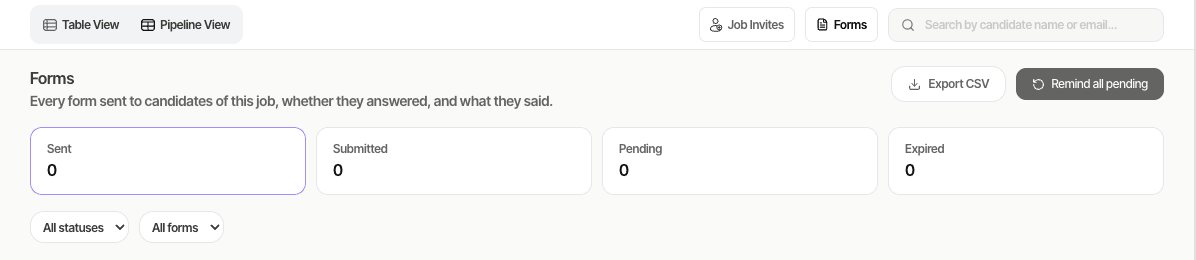
The Forms tab on a job shows every form you have sent to that job’s candidates in one list. You can see who answered, chase people who haven’t, read answers and export the list.
Overview
The list includes both custom forms you shared from a form template (one at a time or in bulk) and information requests sent with Request Additional Information on a candidate’s profile. The four boxes at the top count every form for the job: Sent, Submitted, Pending (still waiting, link works) and Expired (link expired or revoked). Click a box to show only those forms.
Key features
- Filters — by status, by form (or information requests), and a search by candidate name or email. Each row shows the candidate and stage, the form, status, when it was sent, last reminder, submitted date and expiry.
- Remind — ⋯ → Send Reminder for one candidate, or Remind all pending for everyone matching your filters (up to 500 at once; one bulk reminder per job at a time).
- View Response — read each question with the answer. Custom forms also offer Download PDF (a ZIP with the PDF and any uploaded files).
- Revoke Link — stop a custom form link from opening. Submitted forms and information requests can’t be revoked; information request links expire after 24 hours.
- Export CSV — download the list with your current filters (up to 5,000 rows).
Step-by-step
- Go to Jobs, open the job and click Forms.
- Read the summary boxes and filter the list.
- To chase people, click Remind all pending (filtered as you need), or ⋯ → Send Reminder on a row.
- For a submitted form, click ⋯ → View Response, or Download PDF for custom forms.
- To send a new form, select candidates in Table View and choose Share Custom Form, or use the Custom Form tab on a candidate.
Tips
Common issues & fixes
- Reminders were skipped — submitted forms, revoked or expired custom forms (share again to send a new one), and anyone sent or reminded in the last hour (bulk) or 5 minutes (single) are skipped. A message tells you how many and why.
- I don’t see the reminder buttons — you need permission to request data from candidates. Ask your admin.
- A candidate is missing — you see the same candidates as in the job’s applications list; if you only have access to your assigned candidates, only their forms are shown.
- A reminder email failed — reminders follow your company’s sending limits and email settings; the message says why.
- Custom form reminders send a new link and the old one stops working; information request reminders send a new link valid for 24 hours.